Introduction
Social media is one of the most effective tools available to small and micro businesses in India in the modern, digitally-first world. Particularly on Instagram, brands have exceptional chances to establish a visual connection with their audience. Instagram carousels—posts that allow several images or videos in one post—stand out among its features as a flexible way to engage followers, tell stories, and highlight goods and services.
Carousels, as opposed to single-image posts, encourage users to swipe through your content, which boosts engagement and enables companies to present more information in an interactive way. Strategic use of Instagram carousels can help companies educate consumers, establish their brand, and increase website or Google My Business listing traffic. LocalShouts (https://www.localshouts.com) is one platform that assists small businesses in effectively utilizing social media to expand their digital presence and connect with local audiences.
This post offers practical advice on how small businesses can make the most of Instagram carousels to engage with their audience and use them for storytelling.
Understanding Instagram Carousels
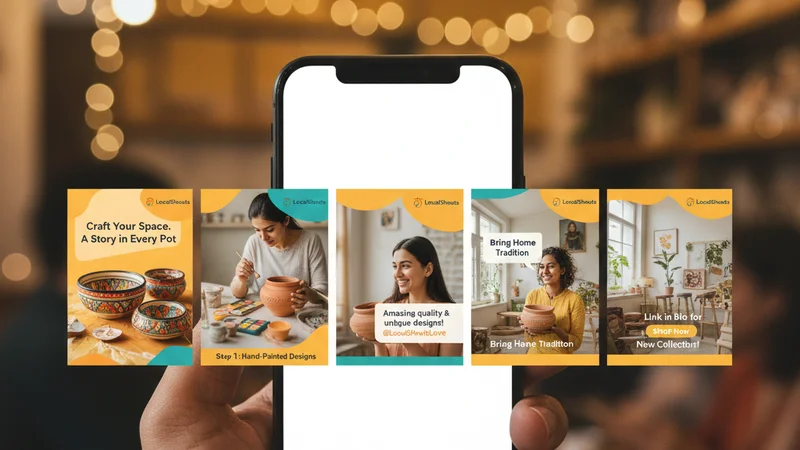
IInstagram carousels let you post up to ten pictures or videos at once. Each slide can be viewed by users swiping horizontally, making the experience dynamic and engaging. Because it allows businesses to present content in a sequential manner, this feature is perfect for storytelling and enhances the narrative's engagement.
Benefits of Using Carousels for Small Businesses:
- Higher Engagement: Carousel posts receive higher engagement rates than single-image posts because users spend more time interacting with the content.
- Better Storytelling: Sequential slides allow you to guide your audience through a story or process.
- Multiple Product Showcase: You can highlight different products, features, or offers in a single post.
- Educational Content: Use carousels to explain how products work, provide tips, or share tutorials.
- Encourages Saves and Shares: Informative and visually appealing carousels are more likely to be saved or shared by followers.
For small and micro businesses, this feature is an excellent way to make your brand memorable and encourage repeat engagement.
Why Storytelling Matters for Small Businesses
Because it emotionally engages audiences, storytelling is an effective marketing technique. Because consumers retain stories longer than facts, storytelling is a powerful tool for communicating your brand's mission and values.
Ways Storytelling Benefits Small Businesses:
- Builds Brand Personality: Stories humanize your business, helping customers relate to your brand.
- Enhances Customer Connection: Sharing stories about your team, production process, or customer experiences builds trust
- Drives Sales: Storytelling can highlight product benefits naturally, encouraging purchases without overt sales pitches.
Instagram carousels provide the perfect canvas to craft these stories visually, combining images, videos, text, and design elements.
Creating Compelling Instagram Carousels
To use carousels effectively, small businesses need a clear plan and engaging content. Here’s a step-by-step guide:
1. Plan Your Story
Decide the story you want to tell. It could be a product launch, a customer success story, behind-the-scenes process, or educational content. Plan the flow of each slide to maintain a cohesive narrative.
2. Design Consistent Slides
Maintain consistent colors, fonts, and branding across all slides. Consistency makes the carousel visually appealing and reinforces brand identity. Tools like Canva or Adobe Express can help create professional slides without heavy design skills.
3. Mix Images and Videos
Carousels allow both images and videos. Use videos for demonstration or dynamic storytelling, and images for showcasing products or highlights. A combination keeps viewers engaged.
4. Include Text Wisely
Use minimal text on slides. Focus on key points, captions, or storytelling phrases that complement visuals. Avoid clutter to ensure the message is clear.
5. Add Calls-to-Action (CTAs)
Encourage users to swipe through the carousel and take action, such as visiting your website, following your page, or checking your Google My Business listing. Clear CTAs drive engagement and conversions.
6. Optimize for Mobile Viewing
Most Instagram users access the app on mobile devices. Ensure fonts are readable, visuals are clear, and designs are mobile-friendly.
Types of Carousels for Storytelling
Different carousel formats serve different storytelling purposes. Small businesses can experiment with various types to see what resonates with their audience:
1. Educational Carousels
Teach your audience something valuable. For example, a bakery could create a carousel explaining the steps of making a signature cake. Educational content positions your business as an authority and encourages shares.
2. Product or Service Highlights
Showcase different features, benefits, or variations of a product. For example, a clothing boutique can display an outfit styled in multiple ways across slides.
3. Customer Stories or Testimonials
Share customer experiences or before-and-after results. Personal stories add authenticity and encourage potential customers to trust your brand.
4. Behind-the-Scenes Content
Show the process of creating a product, packaging, or office culture. This humanizes the brand and fosters a stronger connection with your audience.
5. Promotions and Offers
Carousels are perfect for announcing discounts, special events, or limited-time offers. Each slide can highlight a different product or aspect of the promotion.
Using a mix of these carousel types keeps your feed engaging and maintains audience interest over time.
Leveraging Captions and Hashtags
Captions and hashtags play a crucial role in extending the reach of carousel posts.
Tips for Captions:
- Complement your story rather than repeat it.
- Use conversational language to connect with your audience.
- Ask questions or encourage engagement to boost interaction.
Tips for Hashtags:
- Include a mix of popular and niche hashtags relevant to your business.
- Use local hashtags to attract nearby customers, such as #DelhiBakery or #MumbaiBoutique.
- Limit hashtags to 8–15 per post to maintain readability.
Platforms like LocalShouts (https://www.localshouts.com) help small businesses identify effective hashtags and optimize captions for local reach and engagement.
Promoting Carousels Beyond Instagram
To maximize the impact of carousels, consider cross-promotion:
- Share carousel posts on Facebook and LinkedIn if relevant.
- Include links to carousels in newsletters or on your website.
- Encourage customers to visit your Google My Business page through carousel CTAs.
This approach ensures that your storytelling reaches audiences across multiple digital touchpoints.
Analyzing Carousel Performance
Tracking the performance of carousels is essential for small businesses to understand what resonates with their audience.
Metrics to Track:
- Engagement Rate: Likes, comments, saves, and shares indicate interest.
- Swipe-through Rate: Measures how many users swipe through all slides.
- Click-through Rate: Tracks how many users visit your website or GMB page after viewing the post.
Regular analysis helps businesses refine content strategy, improve storytelling, and achieve better results over time.
Conclusion
For Indian small and micro businesses, Instagram carousels are an effective storytelling tool. Businesses can improve customer engagement, establish their brand, and increase conversions by carefully crafting narratives, fusing captivating text and images, and optimizing for mobile. Reach is increased by utilizing captions, hashtags, and cross-promotion, and analytics offer insights for ongoing development.
Small businesses can effectively grow and compete by integrating Instagram strategies with larger digital presence initiatives through platforms such as LocalShouts (https://www.localshouts.com). Carefully using carousels turns straightforward posts into captivating narratives that engage readers and establish enduring relationships with clients.
Taking the time to become proficient with Instagram carousels can pay off in the form of increased brand awareness, loyalty, and business growth.
Frequently Asked Questions (FAQs)
1. What is an Instagram carousel?
An Instagram carousel is a post that allows up to 10 images or videos in a single post. Users can swipe through the slides to view content sequentially, ideal for storytelling and showcasing products.
2. Why should small businesses use carousels?
Carousels increase engagement, provide space for storytelling, showcase multiple products, and encourage shares and saves. They are perfect for building brand identity and customer connection.
3. How do I create an engaging carousel?
Plan your story, design consistent slides, mix images and videos, use minimal text, include calls-to-action, and optimize for mobile viewing.
4. Can carousels help drive traffic to my website?
Yes. Including clear CTAs and links in your bio or captions can direct followers to your website or Google My Business listing.
5. What types of carousels work best for businesses?
Educational content, product highlights, customer stories, behind-the-scenes posts, and promotional announcements are all effective for engaging audiences.
6. How can I measure the success of a carousel post?
Track engagement (likes, comments, shares, saves), swipe-through rates, and click-through rates to understand audience response and refine your strategy.