Introduction
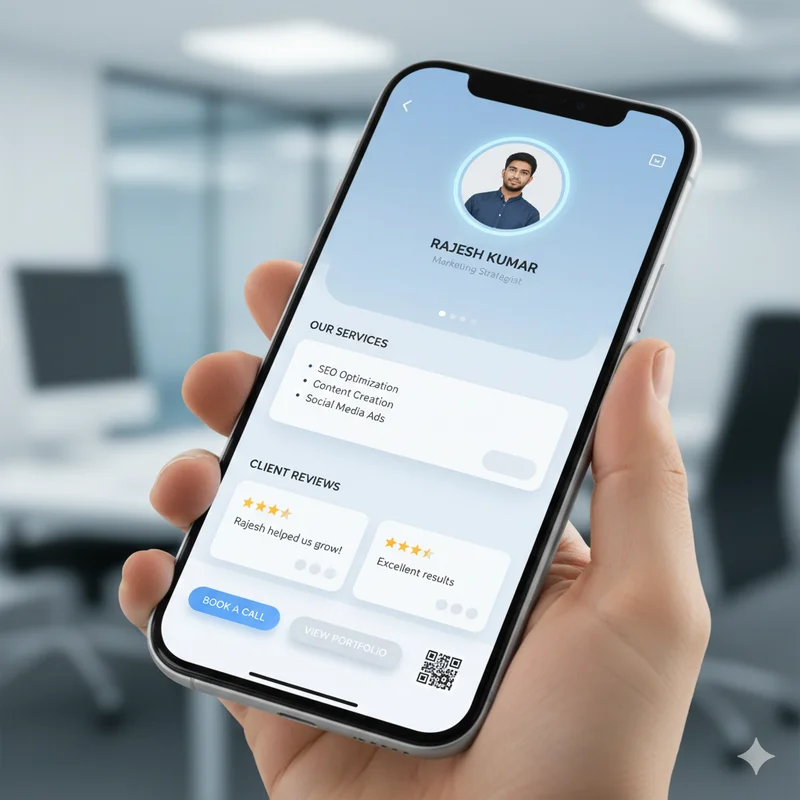
Your LocalShouts page is likely the first electronic touchpoint that consumers see when beginning to consider whether they want to reach out, come to the store, or spend money with you. When your profile looks complete, polished, and professional, people feel more confident when choosing you. When it looks empty or jumbled, sometimes, even if you are in fact amazing, they simply do not feel as confident.
This guide aims to show you how to prepare your LocalShouts page to be as customer-ready as possible, so that you appear professional, trustworthy, and easy to work with, the moment they arrive on your profile.
1. Start With a Clear and Professional Profile Picture
- Your profile picture is your digital handshake.
- Use a clean version of either your logo or simple headshot with a clear background.
- Do not use images that are out of focus or low-resolution
- Use a simple and uncluttered background
- Make sure the image is also consistent with your company's branding
A good profile photo with your logo or clear head shot, will instantly make your page look credible and as though it is well managed.
2. Add a Simple and Understandable Business Description
Customers should understand what you do within 3–5 seconds.
A great description:
- Is short and easy to read
- Clearly states your core services
- Uses simple, customer-friendly language
- Avoids jargon or over-explaining
Example:
“We offer home cleaning, deep cleaning, and sofa cleaning services across Noida and Ghaziabad. Fast, reliable, and professional.”
This tells people exactly who you are and what you provide.
3. Present Your Services in a Simple, Organized Manner
Your services list should support customers to locate what they need quickly.
- Group similar services together
- Use short service descriptions
- Provide very short explanations if necessary
- Highlight high-demand services
A well-organized service area will improve engagement and slower confusion.
4. Include Your Most Important Contact Options
Customers appreciate businesses that are easy to contact!
Be sure to add the following:
- Phone number
- Location, if applicable
- Website, if applicable
LocalShouts helps you consolidate all your customer contact options—no need to present multiple phone numbers or contact links.
5. Upload Images That Build Credibility
Images are proof. They show what you do and how well you do it.
Upload:
- Examples of work
- Before/after images
- Product images
- Your storefront or office
- Images of your team and/or staff
High-quality images build confidence that consumers are choosing a proper business.
6. Clearly Show Customer Reviews
Consumers trust what other customers say above what you say to them.
With LocalShouts, you can do the following:
- Present top reviews
- Show rating
- Provide new reviews regularly
This will not only provide your page a sense of existence, but it will also create instant credibility for each review.
7. Keep Your Page Error-Free and Updated
Small issues can reduce trust:
- Wrong phone number
- Outdated business hours
- Old photos
- Services you no longer provide
Make sure your page remains updated so customers never face confusion. A clean, correct profile shows you are serious about your business.
8. Add Your Social Media Links for More Engagement
Linking your Instagram, Facebook, or YouTube builds depth.
Customers can:
- Explore your content
- See your work in action
- Engage with you across platforms
But LocalShouts keeps everything organized in one place—making discovery easier.
9. Share Your QR Code or Info Instantly When Offline
Your QR code will allow you, to easily share your profile when offline at:
- events
- networking meets
- customer visits
- product demos
- shop interactions
Just let them scan your code and your full digital profile loads up.
10. Look at Your Page Like a Customer WouldBefore sharing your page with everybody, ask yourself:
- Is it easy to read?
- Can customers reach out to me right away?
- Does my profile feel trustworthy?
- Would I choose this business from looking at this page?
If you said yes to all, then you are ready for customers with your LocalShouts Page.
Conclusion
A successful LocalShouts Page does not require fancy designed pages. It requires clarity, professionalism, and engaging customer-first communication.
When customers find everything they need without clicking to another page, in one place—your service, images, reviews, and contact information—trust develops faster, along with business engagement.
A customer-ready page turns into your strongest digital asset keeping business on your mind and your phone. It assists you with attracting customers, earning referrals, and building your local brand.
Frequently Asked Questions
1. Why is it important to complete my LocalShouts profile?
Completing your profile helps to build trust and gives customers a rapid understanding of your business. It leads to a higher level of engagement and conversions.
2. What kind of photos should I upload?
You could upload high-quality work samples, product images, team photos, or before and after to enhance credibility.
3. How often do I need to update my page?
When your services, pricing, hours, or contact information change. Monthly updates provide a fresh experience for your customers.
4. Do customer reviews actually matter?
Yes, reviews are one of the strongest contributing elements of building trust, and customer behavior and decision-making are directly correlated to reviews.
5. Is it possible to use the LocalShouts page in face-to-face situations?
Yes, with your QR code, you will be able to share instantaneously and effortlessly at events or verbally with a customer.
6. What if I don’t have social media?
No problem, a fully populated LocalShouts page will act as your main digital identity.