Introduction
Buzz is the number one ingredient for any successful community event — from a café opening, art fair, fitness bootcamp, or community fair. Creating buzz before your event will not only help create higher attendance, but also excitement and anticipation in your audience that will spread through their social circles.
In our digital-first world, generating buzz doesn't require a large advertising budget. What you need are fast and clever teasers— short, creative glimpses that give the information you want without giving too much away.
This article will help you consider how to best use teaser campaigns while getting your audience excited about your next local event, especially if you're a small business, shop, or community organizer. You will also learn about using a tool like LocalShouts to help you amplify those teasers to more local audiences.
1. Why Teasers Work So Well for Local Events
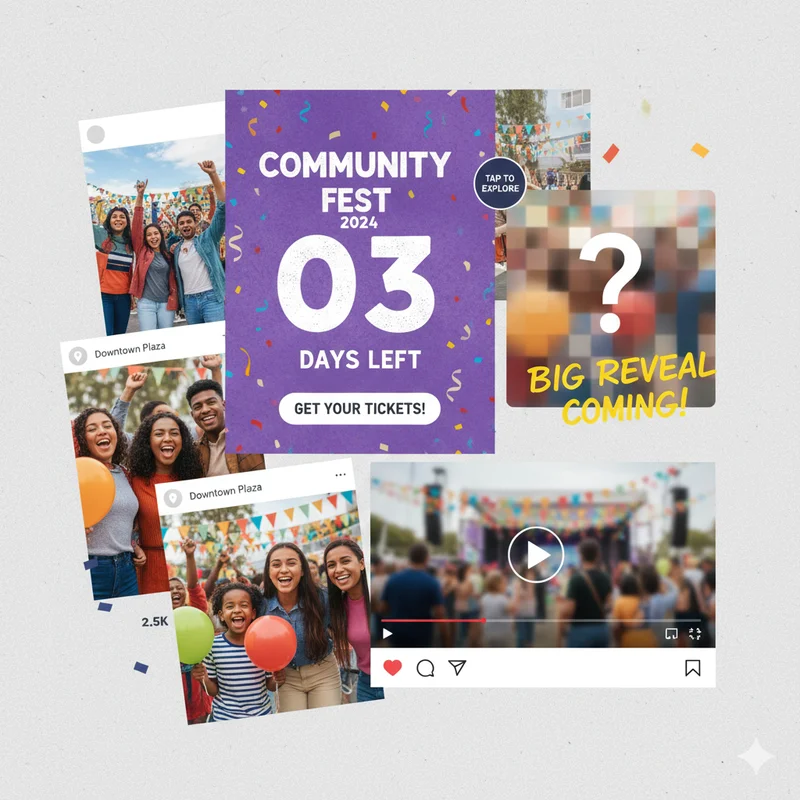
Teasers work because they spark curiosity. When people see just a little bit of what’s coming — like a blurred photo, a countdown, or a sneak peek video — they naturally want to know more.
Unlike traditional announcements that reveal everything at once, teaser campaigns allow you to build suspense step by step, leading up to the big reveal.
Why they’re powerful:
- They generate conversation among your followers.
- They make people feel like they’re part of something exclusive.
- They give you multiple opportunities to promote your event naturally, without sounding repetitive.
In short, teasers turn ordinary event promotions into exciting stories.
2. A Good Early Start & Teaser Schedule
The best teasers are not spontaneous - they're designed.
Begin to outline a teaser plan to release over 2-3 weeks prior to your occasion:
- Week 1: Hint at something coming - image, date, or small details.
- Week 2: Be more specific regarding the theme, guests, or format of the event.
- Week 3: Envelop the entire event; promotion including registration or RSVP links.
By subtly building excitement, your audience continues to think and talk about your event.
Pro-tip: Consider using tools such as the Instagram "Countdown Sticker." You can also use scheduling tools such as Facebook or Meta Business Suite to help simplify the process.
3. Create Teaser Visuals that Makes an Impression
The teaser visuals should illuminate what is in store; however, they should not give away the entire surprise!
Here are a few suggestions for teaser designs:
- A visually blurred image of your event set up or product.
- A close-up or cropped image of one of the top elements associated with the event i.e... decor, new dish being served, stage lighting, etc.
- A short video where team members present on camera say "Something exciting is coming!"
Posters with just the date and hashtag, without other critical information.
Make sure to keep the design neat, clean, bold, and representative of the theme of the event.
4. Use Hashtags and Location Tags from the Start
Local visibility is key. Using location-based hashtags and tags helps you reach people who are actually nearby.
Examples:
- #DelhiWeekendEvents
- #PunePopUpMarket
- #GurgaonMusicNight
- #ChennaiFoodFestival
Tag your city, venue, and any partners involved. When people browse local Stories or posts, they’re more likely to discover your teaser.
You can also list your teaser details and event preview on LocalShouts to get discovered by audiences actively searching for things to do near them.
5. Drop Behind-the-Scenes Clips
Nothing builds anticipation like showing your team getting ready.
People love watching how things come together — it makes them feel connected to your brand or event.
Share Stories or short videos like:
- Staff setting up the space or cooking dishes.
- Sneak peeks of decorations or merchandise boxes.
- A quick time-lapse of preparation.
- The team said, “Can’t wait to show you what we’ve been working on!”
These personal touches make your teaser campaign more human and relatable.
6. Tease Through Sound and Emotion
Sound can be a powerful teaser tool — especially for events like concerts, café launches, or community nights.
Try these approaches:
- Use a short audio clip of the performer or background music.
- Record the sound of clinking cups or sizzling food to tease a food fest.
- Add voiceovers like “Something new is brewing in your neighborhood…”
Pairing visuals with sound builds a stronger emotional connection and curiosity.
7. Work with Local Influencers or Partners
Teases benefit from a broader impact when launched to multiple voices in a coordinated effort.
Work with:
- Local influencers with a related message or theme.
- Businesses that are local partners (cafes, stores, gyms) willing to cross-promote and share posts.
- Local pages or event sites like LocalShouts that post locally about events in the community.
For example, when launching a new boutique-style event, a local café could post the teaser to their Stories, and you could return the favor later with them.
Cross promotion widens impact and strengthens your local network.
8. Develop a Teaser Series
Instead of one teaser post, create a series of teaser posts. Each teaser reveals a little more to the audience, giving them something to guess about.
For example,
- Teaser 1: An unknown photo of something with the words Something Special is coming to the Sector 15
- Teaser 2: A short clip of the set-up for the event space with the words Can you guess what is happening?
- Teaser 3: The words 2 days to go with a countdown poster.
- Teaser 4: A partial reveal of some kind — the name of the event, the theme and/or style of the event.
The beginning reveals little and with each teaser post, it reveals a little more to generate interest. Engaging your audience this way creates anticipation for followers to check back to see what follows.
9. Use Story Polls and Quizzes
Interactive features on Instagram or Facebook make your teasers more fun.
Examples:
- “Can you guess our event theme?” (with multiple-choice options)
- “How excited are you for this?” (using the emoji slider)
- “What do you think we’re launching?”
These small interactions increase engagement, and when more people engage, your post reaches a wider audience organically.
10. Tease Collaborations and Special Guests
If your event features collaborations, artists, or speakers — hint at them subtly before revealing names.
For example:
- Post a blurred photo of the performer with the caption “A surprise guest you love is coming soon!”
- Use clues or emojis that suggest who’s performing.
This strategy works especially well for local music nights, art fairs, or food events with celebrity chefs.
11. Run a “Guess & Win” Contest
Turn your teaser campaign into a mini game!
Ask followers to guess what your event is about or where it will be held. Reward the first few correct answers with free passes, discounts, or shoutouts.
This not only increases engagement but also creates organic buzz as people share your teaser to participate.
12. Tease via Email and WhatsApp Broadcasts
Don’t limit teasers to social media. If you already have loyal customers, use email newsletters or WhatsApp broadcasts to build curiosity.
Send short, visual messages like:
- “Something exciting is coming to your favorite café!”
- “Keep your weekend free — a surprise awaits!”
- “Stay tuned for an announcement tomorrow!”
Then link to your LocalShouts listing so recipients can follow the event once it’s revealed.
13. Use LocalShouts to Amplify Your Teasers
Once your teaser posts are live, list your event on LocalShouts — India’s community-driven platform for local businesses and events.
Why LocalShouts helps:
- It gives your teaser more visibility across your city.
- You can connect with nearby audiences looking for upcoming events.
- It’s free to post and integrates easily with your social media links.
Think of it as your event’s digital home — where teaser traffic can turn into confirmed attendees.
14. End with a Strong Reveal
Your teasers should all build toward one big reveal — the full event announcement.
When you finally reveal:
- Include all event details (date, venue, time, booking link).
- Use the same visual style as your teasers for consistency.
- Share it across all channels — Instagram, Facebook, WhatsApp, and LocalShouts.
Celebrate the reveal with energy — it’s your payoff moment after weeks of buzz!
Conclusion
Creating buzz before an event is both an art and a strategy. Teasers, when done right, transform your local event from just another gathering into a must-attend experience.
By combining creative visuals, interactive content, and early promotion through LocalShouts, you can ensure your event gets noticed — not just online but across your community.
The key is balance: reveal just enough to excite, but not enough to satisfy curiosity until the big day.
So, get started today — your next big event deserves the anticipation it’s worth!
FAQs
1. How early should I start teaser promotions for an event?
Start 2–3 weeks before the event to build curiosity gradually and maintain engagement.
2. What kind of teaser content works best?
Short videos, blurred photos, countdowns, and behind-the-scenes clips perform best because they create mystery and excitement.
3. How often should I post teasers?
Post 2–3 times a week, then increase to daily teasers during the final week before the event.
4. Can I use teasers for small local events too?
Absolutely! Teasers are perfect for small gatherings like café launches, workshops, or markets — they make even local events feel big.
5. How can LocalShouts help with teaser promotions?
LocalShouts helps you list your event, reach verified local audiences, and share teaser links for broader exposure.
6. What should I do after the teaser campaign ends?
Follow up with the event reveal, live updates during the event, and highlight reels afterward to keep engagement going.